Today I passed on a query from @fayenicole: '…know anybody who could run a retro-style game design workshop for teenagers at the British Museum?' on twitter and got a bunch of responses. Since people were so generous with their time, I thought I'd take a few minutes to collate them so they're available the next time someone has a similar query. Feel free to add further suggestions in the comments, particularly for people or agencies who are keen to work with museums and cultural heritage organisations.
@guylevans: 'Gameduino' looks interesting, its an Arduino shield which allows for 8 bit gaming experiments http://gameduino.com
Billy Abbott @cowfish: Not sure on the general design but @Pixelh8 is king of beepy tunes and also might know some people.
Nate Cochrane @natecochrane: Is Braybrook available or the Yak?
And of course thanks to @doctorow for retweeting my message so that other people saw it.
In other news, I learned this week that 'MT' means 'modified tweet' and signifies when someone's shortened or otherwise changed something they're retweeting. Mmm, learning.
This is something I wrote for my MSc dissertation ('Playing with difficult objects: game designs for crowdsourcing museum metadata', view the games I built for it at http://museumgam.es/ or check out the paper (Playing with Difficult Objects – Game Designs to Improve Museum Collections) I wrote for Museums and the Web 2011) about the role of 'distinctiveness' in mental models about collections, that's potentially relevant to discussions around telling stories with and collecting metadata about museum collections. I'm posting it here for reference in the conversation about instances vs classes of objects that arose on the UKMCG list after the release of NMSI (Science Museum, National Media Museum, National Railway Museum) data as CSV. One reason I've been thinking about 'distinctiveness' is because I'm wondering how we help people find the interesting records – the iconic objects, the intriguing stories – in a collection of 240,000 objects.
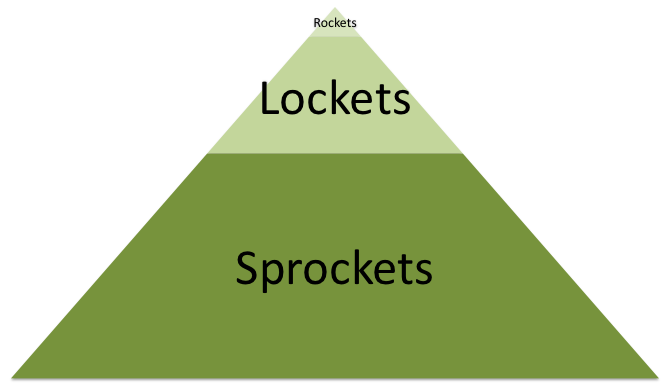
I'm interested in audiences' mental models about when a record refers to the type of object vs the individual object – my sense is that 'rockets', in the model below, are generally thought of as the individual object, and that 'sprockets' are thought of as the type of object, but that it varies for 'lockets', depending how distinctive they are in relation to the person.
I'm also generally curious about the utility of the model, and would love to know of references that might relate to it (whether supporting or otherwise) – if you can think of any, let me know in the comments.
Not all objects are created equal
Both museum objects and the records about them vary in quality. Just as the physical characteristics of one object – its condition, rarity, etc – differ from another, the strength of its associations with important people, events or concepts will also vary. To complicate things further, as the Collections Council of Australia (2009) states, this 'significance' is 'relative, contingent and dynamic'.
When faced with hundreds of thousands of objects, a museum will digitise and describe objects prioritised by 'technical criteria (physical condition of the original material), content criteria (representativeness, uniqueness), and use criteria (demand)' (Karvonen, 2010). In theory, all objects are registered by the collecting institution, so a basic record exists for each. Hopefully, each has been catalogued and the information transcribed or digitised to some extent, but this is often not the case. Records are often missing descriptions, and most lack the contextual histories that would help the general visitor understand its significance. Some objects may only have an accession number and a one word label, while those on display in a museum generally have well-researched metadata, detailed descriptions and related narratives or contextualised histories. Variable image quality (or lack of images) is an issue in collections in general. This project excludes object records without images but does include many poor-quality images as a result of importing records from a bulk catalogue.
This project posits that objects can be placed on a scale of 'distinctiveness' based on their visual attributes and the amount and quality of information about them. Within this project, bulk collections with minimal metadata and distinctiveness have been labelled 'sprockets', the smaller set of catalogued objects with some distinctiveness have been labelled 'lockets', and the unique, iconic objects with a full contextual history have been labelled 'rockets'. This concept also references the English Heritage 'building grades' model (DCMS, 2010). During the project, the labels 'heroic', 'semi-heroic' and 'bulk' objects were also used.
These labels are not concerned with actual 'significance' or other valuation or priority placed on the object, but relate only to the potential mental models around them and data related to them – the potential for players to discover something interesting about them as objects, or whether they can just tag them on visual characteristics.
In theory there is a correlation between the significance of an object and the amount of information available about it; there may be particular opportunities for games where this is not the case.
Project label
Information type
Amount of information
Proportion of collection
Rockets
Subjective
Contextual history ('background, events, processes and influences')
Tiny minority
Lockets
Mostly objective, may be contextual to collection purpose
Catalogued (some description)
Minority
Sprockets
Objective
Registered (minimal)
Majority
Table 1 Objects grouped by distinctiveness
This can also be represented visually as a pyramid model:
Figure 2 A figurative illustration of the relative numbers of different levels of objects in a typical history museum.
References
Department of Media, Culture and Sport (DCMS) (2010) Principles of Selection for Listing Buildings [Online] Available from: http://www.english-heritage.org.uk/content/imported-docs/p-t/principles-of-selection-for-listing-buildings-2010.pdf
Karvonen, M. (2010). "Digitising Museum Materials – Towards Visibility and Impact". In Pettersson, S., Hagedorn-Saupe, M., Jyrkkiö, T., Weij, A. (Eds) Encouraging Collections Mobility In Europe. Collections Mobility. [Online] Available from: http://www.lending-for-europe.eu/index.php?id=167
Russell, R., and Winkworth, K. (2009). Significance 2.0: a guide to assessing the significance of collections. Collections Council of Australia. [Online] Available from: http://significance.collectionscouncil.com.au/
I originally posted this on the Science Museum API documentation wiki.
About this data
These data sets contain information about objects from the collections of the Science Museum, the National Media Museum and the National Railway Museum. These datasets include many items not on display in our galleries, as well as authority records about related people and organisations, events and image files.
The collections include objects relating to aeronautics, agriculture, astronomy, cinematography, medicine, materials, space, television, time measurement, transport and more. They range in size from contact lenses to Concorde 002.
We hope to publish our lists of c9000 people and organisations related to these objects soon, alongside a table linking objects to events.
The data is supplied in CSV (comma-separated format, exported from Excel). The first line of each file contains the field headings. Files may be up to 15mb in size.
The data is released under the Creative Commons Attribution-NonCommercial-ShareAlike (CC BY-NC-SA) licence (http://creativecommons.org/licenses/by-nc-sa/3.0/). Please contact us if you would like to use this data under different conditions.
Why we're releasing the data
We have been providing access to a searchable database of our collections online at http://collectionsonline.nmsi.ac.uk/ for some time now, but through staff attendance at various hack days, we've learned that this interface does not support programmatic search or exploration of the data. We've also learned (through the Cosmos & Culture project) that a number of people found the XML provided by the default .Net service that published the API too complex. CSV is a very simple format, accessible to a wider range of people. We hope that it will be usable by most people.
We're publishing the data in CSV format now as a relatively lightweight experiment. We'd like to understand whether, and if so, how, people would use our data. We'd also like to explore the benefits for the museum and for programmers using our data – your feedback would inform decisions about future investment in more structured data as well as helping shape our understanding of the requirements of those users.
We hope you will be creative with it, but please use it responsibly. If you're not sure whether the museum would be comfortable with your idea, please drop us a line to discuss it.
How you can help
You can help us to improve this resource – let us know if you have any information about our objects, or if you find any errors, though we will probably not republish this data set in the short-term. Please quote the Object Number/s and email: Collections.Online@nmsi.ac.uk
We'd like this experiment to help us understand the needs of potential users but we can only do that with your help – we'd love to hear your comments on how you've used the data, and how we could improve it. If possible, we'd like to feature mashups or other applications made with our data. Please email us at web.team@nmsi.ac.uk, send @sciencemuseum a message on twitter or leave a comment at http://sciencemuseumdiscovery.com/blogs/museumdev.
The unique identifier for a record, based on the museum's own accession number. The number may refer to a single object or (historically) to a collection of objects.
ITEM_NAME
Object name – a simple name or common name. Where possible this is from an established thesaurus (i.e. http://museum-api.pbworks.com/f/NMSI_draft200903_object_name.csv)
TITLE
A short one-line caption or brief description of the object, derived from the existing data. The title should be a summary capturing the essence of an object. Often includes related place and date.
MAKER
The name of the person or company or other organisation that made the object. The Maker field is indexed and linked to the People/Organisation records (to be released shortly) – links should be made by matching strings (internal IDs are not available).
DATE_MADE
The date when an object was made (production date). Dates should be recorded consistently and ranges should be in the format <earlier year>-<later year> e.g. 1671-1700. Approximate dates are written as e.g. c. 1936. This field also contains various strings, including ‘Unknown'.
PLACE_MADE
Place names are indexed in the database and linked into a hierarchy (Getty Thesaurus of Geographic Names with in-house modifications i.e. http://museum-api.pbworks.com/f/NMSI_draft200903_place.csv) and should be recorded consistently because they are derived from a term list. Where known with certainty or reasonable probability the town or city of production is recorded. As a minimum the nation/country of origin or the probable nation/country of production should be recorded. If there is some uncertainty this can be explained in the general description.
MATERIALS
Records what the object is made of and what part of the object is made of that material.
MEASUREMENTS
Record the type of measurements that are most useful for an object, with ‘overall' being the most usual dimensions recorded. Overall will be the amount of space the object takes up when it first arrives in the museum and is stored. Measurements must be recorded consistently in metric units. Compulsory measurements are Size and Weight. The default units of measurement are millimetres and kilograms. Example: overall: 51 mm x 95 mm x 80 mm, 0.371kg,
DESCRIPTION
In this field we try to describe what the what, when, why, where, who information about the object, what it is, what it does, is made of, who made it, where was it made and what makes it unique. This field should be exported as plain text (without markup). The information here is used by the museum to audit an object so it should be described well with each part defined. It should also contain all the information about the object so that an interpreted description can be written (suitable for publication). Technical terms have been avoided as far as possible. Names, dates, places and significant events should be recorded here in a normalized form but will also be recorded in other indexed fields. As far as possible the following are recorded: <number of objects> <name of object, qualifier> <model name, number> <what is the type of object?> <specific information>:<made by…> <type of object> <place made> <date made> <any associated relevant fact> <materials> <colour><serial number><containers> <accessories> <dimensions> <condition and completeness> <identification of parts> <acquisition/provenance information> <story of display, conservation etc.> <other details>
WHOLE_PART
Mostly an internal field.
COLLECTION
A broad subject specialism applied during the Acquisition/ Entry process. NMeM National Media Museum NRM National Railway Museum SCM Science Museum. Collection terms are listed at http://museum-api.pbworks.com/w/page/36515349/NMSI-Collections-list
For more information on authority records, see http://en.wikipedia.org/wiki/Authority_control
You can use it to construct URLs to images of the objects. (The images are hosted on a site built with a third-party solution so the URLs aren't ideal.)
objects.ID_NUMBER is the equivalent to media. OBJECT, giving you a link between the object and media tables (e.g. 1999-719). The media. MEDIAKEY (e.g. 125972) can then be included in a URL, e.g. the image file URL uses the media key: http://collectionsonline.nmsi.ac.uk/grabimg.php?wm=1&kv=125972
Column title
What is it?
MEDIA_ID
e.g. 10327065.jpg
OBJECT
The object ID_NUMBER e.g. 1999-719
MEDIAKEY
e.g. 125972
CAPTION
Optional. E.g. ‘Class 84 locomotive at Barrow Hill, sanding and filling in progress, August 1984'
Currently this data set has fairly random coverage but we would be interested to see whether people find the content useful. If the object was linked to any significant event (historical, political, developmental or other milestone events) or if an object featured at some significant and well-known event or activity, it might be recorded in this table.
Column title
What is it?
Event Name
Includes location and date/date range.
Event Short Name
Event title without location or date (usually)
Event Category
Values include era, war, exhibition, expedition (term list?)
Occurrence Type
E.g. one-time, periodic, annual. Optional
Event Start Date
Single date as year or y/m/d. Mixed formats (sorry!). Also includes BCE dates expressed as negative integers e.g. -3100 Optional
Event End Date
As for Event Start Date. Optional
Display Date
?
Duration
Integer – use with Duration Unit. Optional
Duration Unit
E.g. days, months, years. Use with Duration. Optional
Event Description
Text. Optional
Description Source(s)
May be a URL. Optional
Sort Name
Internal use version of event name
Produced for the Science Museum, London. Last updated by Mia Ridge, March 2011. With thanks to the web, database and documentation teams at NMSI for their support and assistance. Thanks also to @rboulton for testing the documentation.
I originally posted this on the Science Museum API wiki. This version dates to March 2011, as I documented things before leaving to do a PhD.
Documentation for collections data from Science Museum, National Media Museum, National Railway Museum (NMSI) released as CSV
About this data
These data sets contain information about objects from the collections of the Science Museum, the National Media Museum and the National Railway Museum. These datasets include many items not on display in our galleries, as well as authority records about related people and organisations, events and image files.
The collections include objects relating to aeronautics, agriculture, astronomy, cinematography, medicine, materials, space, television, time measurement, transport and more. They range in size from contact lenses to Concorde 002.
We hope to publish our lists of c9000 people and organisations related to these objects soon, alongside a table linking objects to events.
The data is supplied in CSV (comma-separated format, exported from Excel). The first line of each file contains the field headings. Files may be up to 15mb in size.
The data is released under the Creative Commons Attribution-NonCommercial-ShareAlike (CC BY-NC-SA) licence (http://creativecommons.org/licenses/by-nc-sa/3.0/). Please contact us if you would like to use this data under different conditions.
Why we're releasing the data
We have been providing access to a searchable database of our collections online at http://collectionsonline.nmsi.ac.uk/ for some time now, but through staff attendance at various hack days, we've learned that this interface does not support programmatic search or exploration of the data. We've also learned (through the Cosmos & Culture project) that a number of people found the XML provided by the default .Net service that published the API too complex. CSV is a very simple format, accessible to a wider range of people. We hope that it will be usable by most people.
We're publishing the data in CSV format now as a relatively lightweight experiment. We'd like to understand whether, and if so, how, people would use our data. We'd also like to explore the benefits for the museum and for programmers using our data – your feedback would inform decisions about future investment in more structured data as well as helping shape our understanding of the requirements of those users.
We hope you will be creative with it, but please use it responsibly. If you're not sure whether the museum would be comfortable with your idea, please drop us a line to discuss it.
How you can help
You can help us to improve this resource – let us know if you have any information about our objects, or if you find any errors, though we will probably not republish this data set in the short-term. Please quote the Object Number/s and email: Collections.Online@nmsi.ac.uk
We'd like this experiment to help us understand the needs of potential users but we can only do that with your help – we'd love to hear your comments on how you've used the data, and how we could improve it. If possible, we'd like to feature mashups or other applications made with our data. Please email us at web.team@nmsi.ac.uk, send @sciencemuseum a message on twitter or leave a comment at http://sciencemuseumdiscovery.com/blogs/museumdev.
The unique identifier for a record, based on the museum's own accession number. The number may refer to a single object or (historically) to a collection of objects.
ITEM_NAME
Object name – a simple name or common name. Where possible this is from an established thesaurus (i.e. http://museum-api.pbworks.com/f/NMSI_draft200903_object_name.csv)
TITLE
A short one-line caption or brief description of the object, derived from the existing data. The title should be a summary capturing the essence of an object. Often includes related place and date.
MAKER
The name of the person or company or other organisation that made the object. The Maker field is indexed and linked to the People/Organisation records (to be released shortly) – links should be made by matching strings (internal IDs are not available).
DATE_MADE
The date when an object was made (production date). Dates should be recorded consistently and ranges should be in the format <earlier year>-<later year> e.g. 1671-1700. Approximate dates are written as e.g. c. 1936. This field also contains various strings, including ‘Unknown'.
PLACE_MADE
Place names are indexed in the database and linked into a hierarchy (Getty Thesaurus of Geographic Names with in-house modifications i.e. http://museum-api.pbworks.com/f/NMSI_draft200903_place.csv) and should be recorded consistently because they are derived from a term list. Where known with certainty or reasonable probability the town or city of production is recorded. As a minimum the nation/country of origin or the probable nation/country of production should be recorded. If there is some uncertainty this can be explained in the general description.
MATERIALS
Records what the object is made of and what part of the object is made of that material.
MEASUREMENTS
Record the type of measurements that are most useful for an object, with ‘overall' being the most usual dimensions recorded. Overall will be the amount of space the object takes up when it first arrives in the museum and is stored. Measurements must be recorded consistently in metric units. Compulsory measurements are Size and Weight. The default units of measurement are millimetres and kilograms. Example: overall: 51 mm x 95 mm x 80 mm, 0.371kg,
DESCRIPTION
In this field we try to describe what the what, when, why, where, who information about the object, what it is, what it does, is made of, who made it, where was it made and what makes it unique. This field should be exported as plain text (without markup). The information here is used by the museum to audit an object so it should be described well with each part defined. It should also contain all the information about the object so that an interpreted description can be written (suitable for publication). Technical terms have been avoided as far as possible. Names, dates, places and significant events should be recorded here in a normalized form but will also be recorded in other indexed fields. As far as possible the following are recorded: <number of objects> <name of object, qualifier> <model name, number> <what is the type of object?> <specific information>:<made by…> <type of object> <place made> <date made> <any associated relevant fact> <materials> <colour><serial number><containers> <accessories> <dimensions> <condition and completeness> <identification of parts> <acquisition/provenance information> <story of display, conservation etc.> <other details>
WHOLE_PART
Mostly an internal field.
COLLECTION
A broad subject specialism applied during the Acquisition/ Entry process. NMeM National Media Museum NRM National Railway Museum SCM Science Museum. Collection terms are listed at http://museum-api.pbworks.com/w/page/36515349/NMSI-Collections-list
For more information on authority records, see http://en.wikipedia.org/wiki/Authority_control
You can use it to construct URLs to images of the objects. (The images are hosted on a site built with a third-party solution so the URLs aren't ideal.)
objects.ID_NUMBER is the equivalent to media. OBJECT, giving you a link between the object and media tables (e.g. 1999-719). The media. MEDIAKEY (e.g. 125972) can then be included in a URL, e.g. the image file URL uses the media key: http://collectionsonline.nmsi.ac.uk/grabimg.php?wm=1&kv=125972
Column title
What is it?
MEDIA_ID
e.g. 10327065.jpg
OBJECT
The object ID_NUMBER e.g. 1999-719
MEDIAKEY
e.g. 125972
CAPTION
Optional. E.g. ‘Class 84 locomotive at Barrow Hill, sanding and filling in progress, August 1984'
Currently this data set has fairly random coverage but we would be interested to see whether people find the content useful. If the object was linked to any significant event (historical, political, developmental or other milestone events) or if an object featured at some significant and well-known event or activity, it might be recorded in this table.
Column title
What is it?
Event Name
Includes location and date/date range.
Event Short Name
Event title without location or date (usually)
Event Category
Values include era, war, exhibition, expedition (term list?)
Occurrence Type
E.g. one-time, periodic, annual. Optional
Event Start Date
Single date as year or y/m/d. Mixed formats (sorry!). Also includes BCE dates expressed as negative integers e.g. -3100 Optional
Event End Date
As for Event Start Date. Optional
Display Date
?
Duration
Integer – use with Duration Unit. Optional
Duration Unit
E.g. days, months, years. Use with Duration. Optional
Event Description
Text. Optional
Description Source(s)
May be a URL. Optional
Sort Name
Internal use version of event name
Produced for the Science Museum, London. Last updated by Mia Ridge, March 2011. With thanks to the web, database and documentation teams at NMSI for their support and assistance. Thanks also to @rboulton for testing the documentation.
I originally posted this on the Science Museum API wiki in 2008, this version dates from about March 2011 (when I left the Science Museum Group to start a PhD).
I thought I’d have a quick play with the data last night, and so managed to import them into a database and built a quick web app called ‘Things’: http://what-is-this.heroku.com/
The main thing I wanted out of the data was to be able to browse by type-of-thing (eg ‘steam engines’). Given that this information isn’t easily accessible from the existing data, the first thing that ‘Things’ does is ask people to help classify the objects.
It’s sort of like tagging. But easier. :-)
If I get enough things classified I may have a go at seeing if an algorithm can learn from the data and classify the rest.
Given the number of crowdsourcing projects around*, the next step for the museum may be working out how to manage and make the most of user-created data we get back from projects like this. This would be an excellent problem to have.
* I’ve also got lots of data to handover based on tags and facts added by people playing with the astronomy collections on Museum Metadata Games, which was again only possible because the Powerhouse Museum has an API and the Science Museum made an earlier, XML-based API.
A few people have commented on the licence (Creative Commons Attribution-NonCommercial-ShareAlike, CC BY-NC-SA) and on the format (CSV). As tomorrow is my last day, I can’t really speak for the museum but the intention is to learn from how people use the data – the things they make, the barriers they face, etc – and iterate (as resources allow) until we get to an optimal solution (or solutions). So please get in touch if you’ve got requests or think you can help clear up some of the issues these kinds of projects face, because there’s a good chance you’ll help make a difference.
The licence is a pragmatic solution – it’s clarification of existing terms rather than a change to our terms, because this avoided a need for legal advice, policy review, etc, that would have added several months to the process.
And yes, I know CSV is quick and dirty, but it’s effective. The museum sector is still working out how to match the resources available with the needs of mash-up type developers who work best with JSON and those who are aiming for linked open data; my hope is that your feedback on this will help museums figure out how to support people using open data in various forms. A simple solution like this also means it’s easy for the museum to re-run the export to update the data as time goes on, and that anyone, geek or not, can open the files without being startled by angle brackets and acronyms. Also, did I mention it was quick?
I converted the source CSV to XML using my CSV Converter program, which is a home-made program I wrote to do a “mail-merge” on CSV data, with the aim of easily generating other formats such as XML.
The geocoding was carried out by calls to my place URL-ifier program. This uses the standard Geonames query API, but splits a place description into its component place names (e.g. “Swindon, Wiltshire, England” becomes three place names) and searches for a “Swindon” contained within places “Wiltshire” and “England”.
I wrote an XSLT transform which copied the source document, and each time it found a place field, it called out to my URL-ifier using the document() function:
Where this was successful in inferring a Geonames identifier, it added a “geonamesId” attribute to the PLACE_MADE field. So the result is a copy of the source data, with added geocoding.
All of the NRM data was geocoded in a single XSLT operation, but this operation had to call my URL-ifier, and hence the Geonames API, many times. There are limits on how hard you can hit this service, so care needs to be exercised! (You can get your own Geonames identifier for free, and then have your own allocation of API calls, if you want to use this service in a serious way.)
Now that the data contains Geonames URLs, you have access to all the background information about each place. All Geonames entries have lat/long co-ordinates (which is what you need to stick a pin on a map in your browser, using e.g. KML markup), but in addition will often have info such as population. You just need to make an HTTP request for the Geonames URL, specifying that you want RDF back, e.g.: http://light.demon.co.uk/scripts/cgiforwarder.exe?url=http://sws.geonames.org/2633352/&accept=rdf and process the RDF/XML which comes back.
Personally, this kind of thing makes it all worthwhile – we can’t easy export our entire geographical hierarchy, so being able to geocode the imperfect data we have is really useful.
If you’ve done something interesting with our data we’d love to feature it. We’re also curious to know who’s having a look at it, even if you’re not at the point of having something to share.
Finally, I’d almost forgotten to thank the many wonderful people who’d contributed to the Museums and the machine-processable web site or come along to #linkingmuseums meetups to work out how to get to re-usable museum data. I’ll be keeping up the wiki in future, and can be contacted @mia_out.
I’m very excited about sharing this with you – we’ve just released 218,822 records about objects from the collections of the Science Museum, the National Media Museum and the National Railway Museum.
The collections include objects relating to aeronautics, agriculture, astronomy, cinematography, medicine, materials, space, television, time measurement, transport and more. They range in size from contact lenses to Concorde 002.
We’ve released the files as a lightweight experiment – we’d like to understand whether, and if so, how, people would use our data. We’d also like to explore the benefits for the museum and for programmers using our data – your feedback will inform decisions about future investment in more structured data as well as helping shape our understanding of the requirements of those users. The files are in CSV format – because it’s a really simple format, viewable in a text editor, we hope that it will be usable by most people.